
Performer General Info
Welcome to your TipTheShow performer information page.
This page explains how TipTheShow works, how payments and banking information are securely handled through Stripe, and what to expect when using your performer account, dashboard, QR code and payout setup.
Table of Contents
- Stripe, Banking & Security
- What TipTheShow Is
- Your Performer Account
- Your Performer Dashboard
- Your Public Tip Page
- Your QR Code
- Profile Image Guidelines
- Getting Paid
- Venues and Shows
- Keeping Your Info Updated
- Need Help?
Stripe, Banking & Security
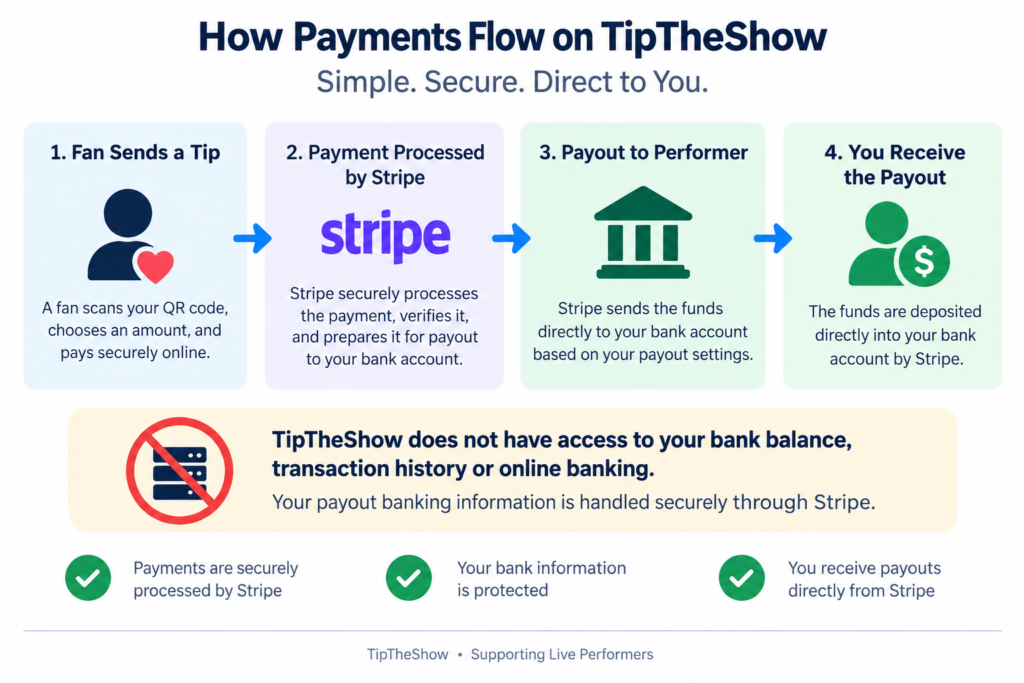
TipTheShow uses Stripe to securely process payments and send payouts to performers.
Stripe is a major global payments company used by more than 5 million businesses, from independent operators to large international companies.
Stripe is certified as a PCI DSS Level 1 service provider, the most stringent level of certification available in the payments industry.
When you set up your payouts, the financial onboarding process is completed through Stripe. Stripe securely collects the personal and banking information needed to verify your identity and establish where your payouts should be deposited.
You should never provide your online banking password to TipTheShow. Your payout banking information is entered through Stripe’s secure onboarding process.
TipTheShow does not have access to your bank balance, transaction history or online banking. Your bank account is connected to Stripe so payouts can be deposited to you.
Stripe may ask for information such as:
- Your legal name
- Contact information
- Date of birth
- Address
- Performer or business details
- Banking information for deposits
- Identity verification, if required
These are normal requirements for setting up an account that receives financial payments.
Why does Stripe need this information?
Because TipTheShow involves real-money payments and bank deposits, Stripe needs to verify the identity of the person receiving the money and establish where payouts should be deposited.
Stripe Connect is specifically designed to securely onboard and pay people and businesses receiving payments. Stripe also manages payment-security and verification requirements as part of this process.
For Canadian bank accounts, the payout information required will normally include:
- Institution number
- Transit number
- Account number
These details can usually be found on a void cheque or direct-deposit form provided by your bank.
Once your Stripe setup is complete and Stripe confirms that your account is ready, tips received through TipTheShow can be processed through Stripe and paid to your bank account.
What TipTheShow Is
TipTheShow helps performers receive tips from audience members using a simple QR code.
Instead of asking people to search for your name, carry cash, or download an app, TipTheShow gives you a dedicated tip page that can be opened instantly from a QR code.
Audience members scan the code, choose an amount, and send a tip using secure online payment options.
TipTheShow is designed for live performers, musicians, bands, entertainers, and venue-based shows.
Your Performer Account
Your performer account gives you access to your private performer tools.
Once your account is set up, you can log in to manage important performer details, including:
- Your performer or stage name
- Your contact information
- Your profile image
- Your public tip page details
- Your Stripe onboarding status
- Your QR code and performer materials
Your account is private. Audience members do not see your dashboard.
Your Performer Dashboard
The Performer Dashboard is your main starting point after logging in.
From your dashboard, you may be able to:
- Review your performer information
- Upload or update your performer image
- Access your QR code
- Continue Stripe onboarding
- View general performer information
- Return to your main performer tools
The dashboard is intended to keep everything simple and easy to find.
Your Public Tip Page
Your public tip page is the page audience members see after scanning your QR code.
This page may include:
- Your performer or stage name
- Your performer image
- A short message or call to action
- Tip amount options
- Secure payment checkout
The goal of the public tip page is to make tipping fast, clear, and comfortable for the audience.
Your QR Code
Your QR code connects directly to your TipTheShow performer experience.
You can use your QR code on:
- Table tents
- Posters
- Signs
- Business cards
- Stage displays
- Social media graphics
- Venue materials
For best results:
- Place the QR code where people can easily see it
- Make sure it is large enough to scan
- Avoid placing it too far from the audience
- Keep the code flat and unobstructed
- Test the QR code before using printed materials
A clear QR code helps more people reach your tip page quickly.
Profile Image Guidelines
Your performer image helps audience members recognize that they are tipping the right person or group.
Recommended image guidelines:
- Use a clear photo of the performer, band, or act
- Choose an image with the main subject centred
- Avoid images where faces or instruments are cut off
- Avoid very dark, blurry, or low-resolution photos
- Use a photo that still looks good when cropped
- Landscape or wide images usually work best
Images from phones are usually fine, but very tall portrait images may need to be cropped to fit display areas.
The most important thing is that the main performer or focal point is easy to recognize.
Getting Paid
Once your Stripe onboarding is complete and your account is approved, tips can be processed and paid out through Stripe.
Payout timing may depend on:
- Stripe account status
- Bank processing times
- Stripe’s payout schedule
- Verification requirements
- Whether this is your first payout
If Stripe needs more information, payouts may be paused until the required details are completed.
Your Stripe dashboard is the best place to view payout status and payment details.
Venues and Shows
TipTheShow can be used in many live performance settings, including:
- Pubs
- Restaurants
- Cafés
- Private events
- Festivals
- Open mics
- Busking-style performances
- Theatre or variety shows
- Community events
Venues may help by displaying your QR code, placing table tents on tables, or mentioning TipTheShow during the event.
The easier it is for the audience to find your QR code, the more likely they are to use it.
Keeping Your Info Updated
Please keep your performer information accurate and up to date.
This is especially important for:
- Performer name
- Contact email
- Phone number
- Profile image
- Stripe onboarding status
- Public tip page details
If your information is outdated, audience members may be confused, or payment setup may be delayed.
Need Help?
If something does not look right, or if you are having trouble with your performer account, contact TipTheShow support.
Useful details to include when asking for help:
- Your performer or stage name
- The email address used for your account
- A short description of the issue
- A screenshot, if helpful
- Whether the issue is with login, your profile, QR code, Stripe, or payouts
We’ll do our best to help you get back to performing and receiving tips.